Dashboard Guide
Filtering exchanges, pinning favorites, search, backtests, and reading the screener like a pro.
DEX filters
Toggle any exchange on or off. Only pairs from active exchanges show in the screener.
- Click an exchange pill to disable it. Click again to re-enable
- At least 2 exchanges must stay active (you need both legs for delta-neutral)
- Reset link appears when filters are applied. Click to restore defaults
- Your filter preferences persist between sessions

Pinning
Pin an exchange to always surface its pairs first, regardless of sort order.
Hover any active exchange pill and click the pin icon. Pinned exchanges get a blue highlight. Pairs involving that exchange float to the top of the table.
Click the pin again to unpin.
Search
The search bar filters by symbol. Type "ETH" to find all ETH pairs.
It also understands common names:
| You type | It finds |
|---|---|
| gold | XAU/USDC |
| oil | WTI/USDC |
| silver | XAG/USDC |
| JPY | USDJPY/USDC |
| S&P | SP500/USDC |
Useful for traditional markets listed as perps on some DEXs.
APR vs Smart sorting
Two tabs in the top-right corner of the screener:
APR tab sorts by raw net funding rate, highest first. This is the default. Dead markets and pairs with no liquidity are already filtered out, but the ranking is purely by rate.
Smart tab sorts by Smart Score. This composite rating weighs stability, liquidity depth, trend direction, spread risk, and data confidence alongside APR. A pair with slightly lower APR but rock-solid consistency will rank higher than a volatile spike.
Switch between tabs to see different angles on the same data.
Table columns
| Column | What it shows |
|---|---|
| Pair | Asset symbol. Common name shown below if applicable |
| Long | Exchange for the long leg. Clickable link to the exchange |
| Long APR | Annualized funding rate on the long side |
| Short | Exchange for the short leg |
| Short APR | Annualized funding rate on the short side |
| Net APR | The spread you earn. Color-coded: bright green above 50%, green above 20%, orange above 10% |
| Spread Risk | Price divergence risk between exchanges. Low (green), Med (yellow), High (red) |
| 30D Avg | Backtested average APR from 30 days of historical data |
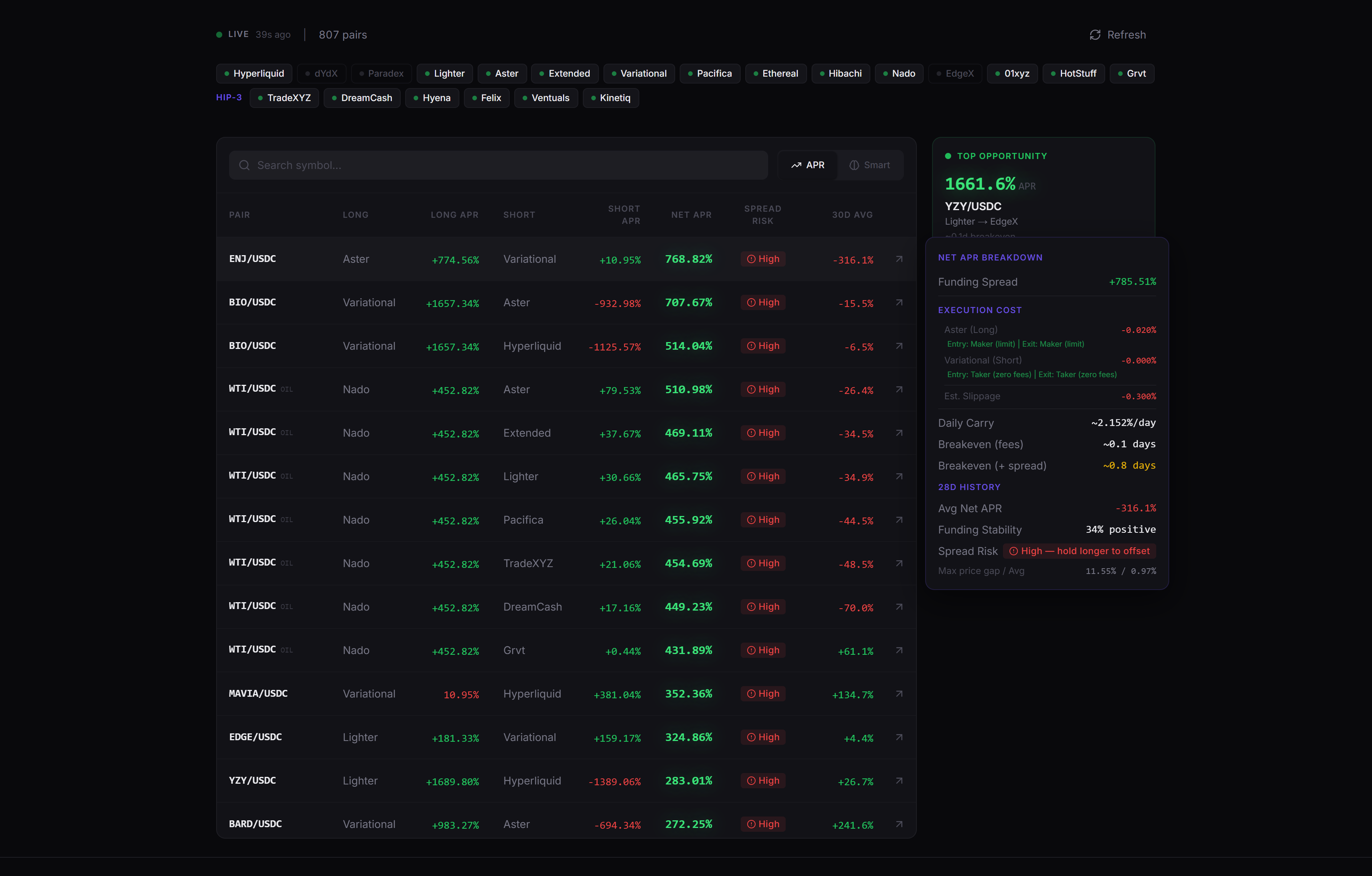
APRs are annualized regardless of funding interval, so rates are always comparable across venues. Native intervals vary by exchange and even by market — many venues pay hourly, others every 4 or 8 hours. On position cards, hover the funding chip to see the native per-interval rate.
Hover details
On desktop, hover any row to see a detailed breakdown:
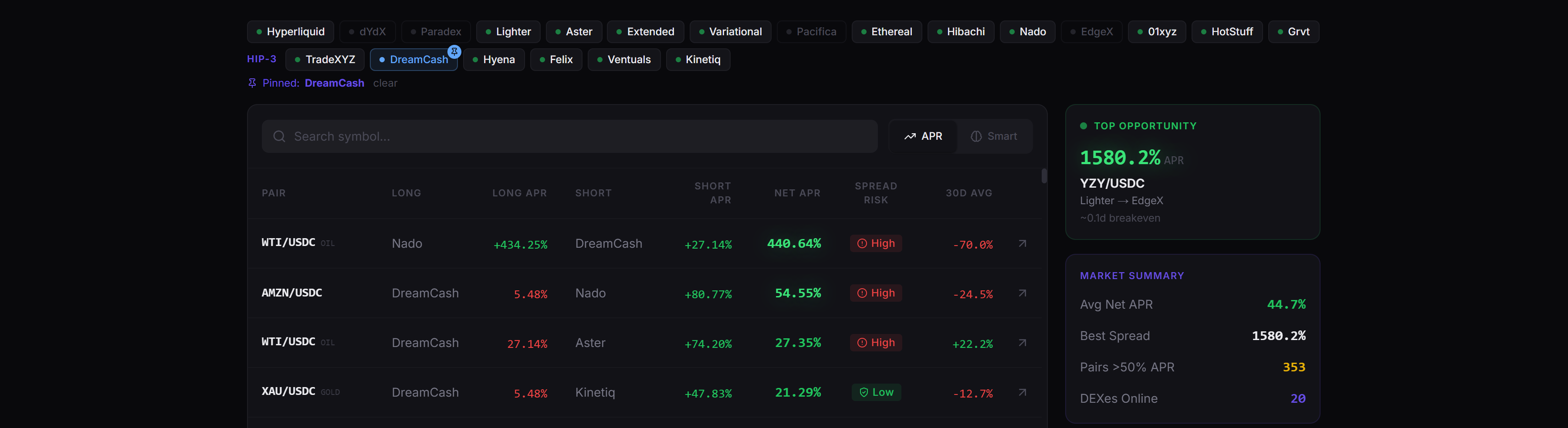
Execution cost:
- Long exchange fee (maker/taker)
- Short exchange fee (maker/taker)
- Estimated slippage
Returns:
- Daily carry in dollar terms
- Breakeven days (how long to cover entry/exit fees)
- Breakeven including spread risk (if price data available)
30-day history (if data exists):
- Average net APR over the period
- Funding stability (% of hours the spread was positive)
- Spread risk badge with max/avg price gap
- Smart Score (visible when Smart tab is active)
Backtest modal
Click any row to open the backtest. This is where you validate an opportunity before entering.
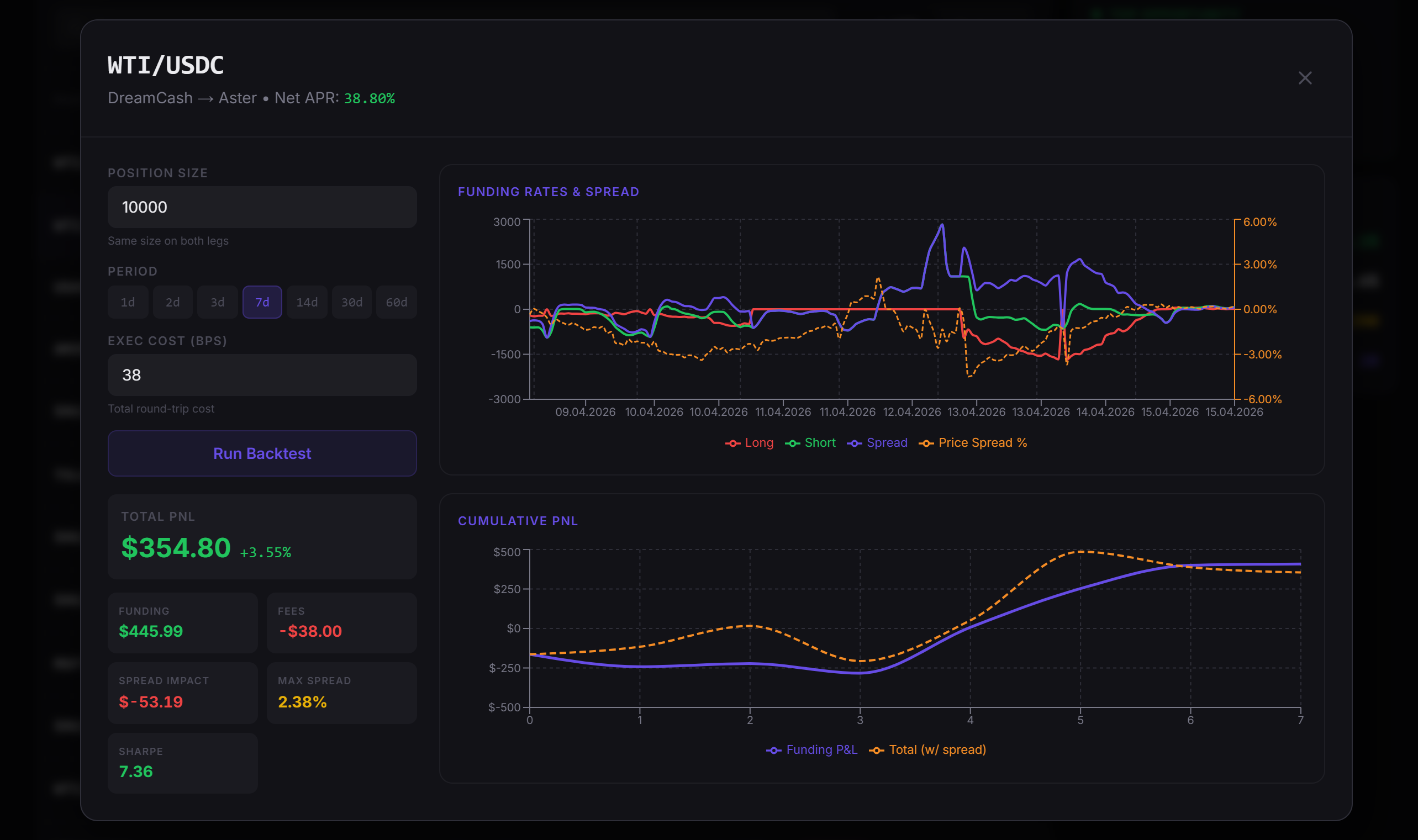
Configure:
- Position size. Dollar amount to simulate
- Period. Quick-select: 1d, 2d, 3d, 7d, 14d, 30d
- Execution cost. Pre-filled from fee data, adjustable in basis points
Results after running:
- Total PnL. Dollar amount and ROI percentage. Includes spread impact if price data exists
- Funding earned. Raw funding income before fees
- Fees paid. Entry + exit costs for both legs
- Spread impact. P&L from price divergence between exchanges. Negative means the spread widened against you
- Max spread. Worst price divergence during the hold period
- Sharpe ratio. Risk-adjusted return. Above 1 is good, above 2 is strong, below 0 means you'd have lost money
Two charts:
- Funding rates. Long rate, short rate, and spread over time. Price spread overlay if available
- Cumulative PnL. Funding-only PnL vs total PnL (with spread impact)
Live status
Top-left corner shows data freshness:
- Green dot + "LIVE just now" means data updated within the last 2 minutes
- Yellow dot + "STALE" means the last update was over 2 minutes ago
Data auto-refreshes every 60 seconds. Switching back to the tab also triggers a refresh if more than 30 seconds have passed.
Refresh
Click the refresh button (top-right) to force-fetch fresh data from all exchanges. The icon spins while loading.
FAQ
How do I filter which exchanges show in the screener?
Click an exchange pill to disable it and click again to re-enable; at least 2 exchanges must stay active since a delta-neutral trade needs both legs. Filter preferences persist between sessions.
What's the difference between the APR tab and the Smart tab?
The APR tab sorts by raw net funding rate, highest first. The Smart tab sorts by Smart Score, a composite that weighs stability, liquidity depth, trend direction, spread risk, and data confidence alongside APR, so a slightly lower-APR pair with rock-solid consistency can rank above a volatile spike.
How often does dashboard data refresh?
Data auto-refreshes every 60 seconds, and switching back to the tab triggers a refresh if more than 30 seconds have passed. A green dot marks data updated within the last 2 minutes; a yellow "STALE" dot means the last update was longer ago.
What does the backtest modal show?
After configuring position size, a time period (1-30 days), and execution cost, it returns total PnL and ROI, funding earned before fees, fees paid, spread impact, max spread, and a Sharpe ratio, plus charts of funding rates over time and cumulative PnL.