The Trade page
Find your way around /trade in both layouts, from Your money and the ticket to Positions, History, the dense view and wallet switching.
Trade is where you open a delta-neutral funding pair and look after it until it closes. You go long a coin on one venue and short the same size on another, so price moves on the two legs cancel and you keep the gap between the two funding rates.
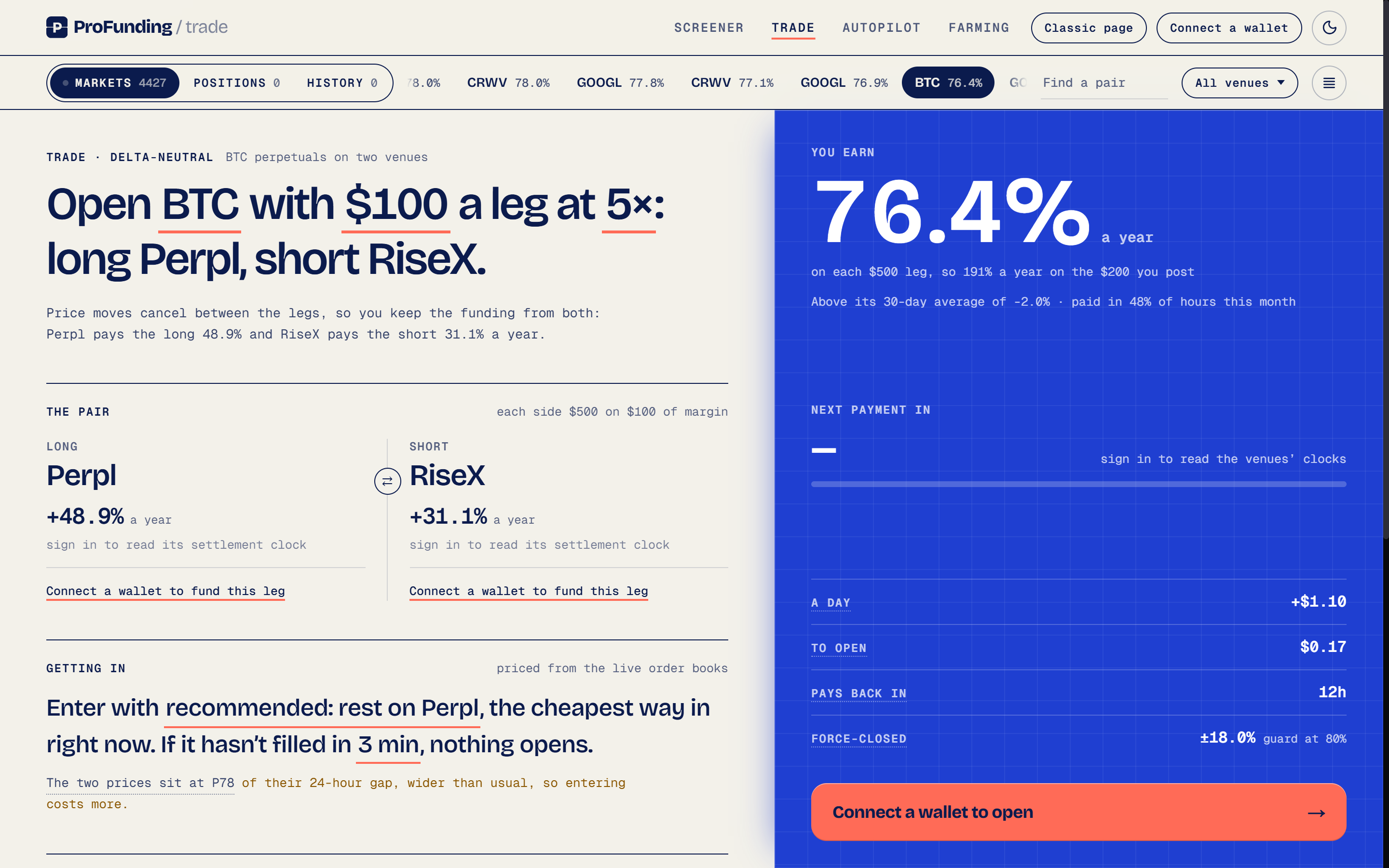
Two layouts, same data
| Layout | How it is arranged |
|---|---|
| New | The ticket reads as a sentence you edit, with its figures and the Open button beside it. Markets, Positions and History are tabs under the masthead. Your balances open in a sheet called Your money |
| Classic | Three columns: wallets and venues on the left, the ticket (or the position you picked) in the centre, and a rail with Markets, Positions and History on the right |
Both read the same data and show the same numbers. Switch with Classic page or New Trade page in the masthead. Nothing reloads, and your pair, amount, leverage and wallets come with you. The choice is remembered in this browser.
The masthead
The bar across the top links to Screener, Trade, Autopilot, Farming and Darkside, switches between light and night mode, and holds your wallet. In the new layout the wallet is a pill:
| The pill shows | What it means |
|---|---|
| Connect a wallet | No wallet connected |
| Sign in | A wallet is connected but not signed in |
| All wallets · $Xk free | Signed in. Click it to open Your money |
A dot on the pill means a venue account needs a sign-in.
Picking a pair
The Markets ticker lists pairs best rate first, each with its net APR. Your Screener rules order the ticker but never hide a pair: pairs outside them come after, muted, and hovering one names the rule it fails. Find a pair filters by symbol. The venue filter is shared with the Screener, so a change here changes it there too.
An On fire badge marks a pair where one hour of net funding already covers the estimated cost in and out.
A Screener link opens /trade with the pair loaded. To price any coin on any two venues, use Any pair (see Placing orders).
Your money
Your money shows every venue balance you can trade from, grouped by wallet. In the new layout it opens from the money pill; classic shows it in the left column.
Free to trade at the top is the free margin a new position can draw on. Venues that share one account, such as Hyperliquid and its HIP-3 markets, count once. A balance that can't be read is left out of the total, never counted as zero.
| The row says | What to do |
|---|---|
| Reading… | Wait for it |
| Not responding | Nothing. The venue comes back on its own |
| Signed out | Sign in again |
| Didn't load | Retry |
| Not connected | Connect |
Click a row for Deposit, Move and Withdraw where the venue supports them. Its ••• menu sets the default wallet for that venue or disconnects it. Move between venues, at the foot of the sheet, withdraws from one venue to your wallet and deposits into the other; see Funding and transfers.
The ticket
In the new layout the ticket is one sentence:
Open PAIR with $AMOUNT a leg at LEV×: long VENUE, short VENUE.
Each underlined word opens a tray. The amount is the margin each leg posts; each leg's position is the amount times the leverage. A fresh ticket starts at $100 a leg at 5×, which is $500 long on one venue and $500 short on the other. Leverage is 1×, 2×, 3×, 5× or 10×, lower when either venue allows less on that market.
| Section | What it holds |
|---|---|
| The pair | Each leg's annual rate, what it earns or pays per settlement, and the wallet that funds it. ⇄ swaps long and short |
| Getting in | How you enter: Recommended, Market / Market, Limit / Market or TWAP, each priced from the order books |
| Guards | Exits that arm once both legs fill |
| What it has paid | Settled funding replayed at your size over the last 7, 14 or 30 days, less the round trip. Past rates, not a forecast |
| Figure | What it means |
|---|---|
| You earn | Net APR on each leg's size at today's rate. The line under it is the return on all the margin you post: net APR × leverage ÷ 2 |
| A day | Funding a day at today's rate, before fees |
| To open | Slippage plus fees for the way in you chose |
| Pays back in | The round trip divided by funding a day |
| Force-closed | About how far price can move, as ± %, before a leg is liquidated |
The button names whatever stands between you and an open: Connect a wallet to open, Sign in to open, or a block such as Not enough margin on VENUE with its fix above it. Once ready it reads Open PAIR for $X.XX, where the figure is what the open is priced to cost. Pressing it opens a panel that steps through each leg as the venues report fills.
Classic puts the same ticket in its centre column, with a Net APR dial, size, leverage, entry strategy chips, cost to open and break-even, guards and the button.
Signed out, you can still set everything and see the open priced.
Positions
Positions lists the pairs this browser tracks for the account you're signed in with. In the new layout each pair gets a lane with its size, age and route, what it has paid since it opened, and If closed now: what a market close would pay right now, after close fees, open fees and funding earned. A pair with one leg open shows One leg open and Fix it →.
Click a lane to open the position page: each leg's rate, mark and liquidation price, a live Close spread chart, Getting out (Market, Slow close, TWAP and Find the Exit, each with what it would pay now), and its Guards.
To bring in a pair opened elsewhere, click Look for positions on your venues at the top of the Positions tab (Sync from DEXs in classic).
Managing positions and Closing positions go deeper.
History
History keeps every pair you have closed, with what it made, what it made on margin, and why it closed. Signed in, it reads closed trades saved on the server, so they survive clearing your browser and switching devices. An est tag means some fees are rate-card estimates rather than the fees on the fills. Share builds a card for a closed trade.
Dense view
The rows button at the right of the tab strip turns on the dense view, which fits more on the Markets tab. At 1240 px and wider it shows the pairs as a sortable table beside the ticket (Pair, APR, 30D, Paid, Gap), with your open positions in a table under it. Signed in, the choice follows your account.
Wallets
You can connect several wallets, EVM and Solana. Each leg is funded by exactly one wallet; the ticket won't split a leg across wallets, because that would open two positions that can't be closed as one pair. Orders go out with the trading key saved for each venue, so a pair funded by two wallets doesn't need a wallet switch. Signing in to a venue as a particular wallet does, and the page prompts you to switch in your wallet extension.
FAQ
What is the difference between the new and classic Trade layouts?
Both read the same data and show the same numbers. The new layout writes the ticket as a sentence with Markets, Positions and History as tabs; classic uses three columns with the ticket in the centre. Switch with the button in the masthead.
Is the amount on the ticket margin or position size?
The amount is the margin each leg posts. Each leg's position is the amount times the leverage, so $100 a leg at 5× opens $500 long on one venue and $500 short on the other.
Why is a balance missing from Free to trade?
A balance that can't be read is left out of the total, never counted as zero. Retry it from its row in Your money.
Questions?
Ask in our Telegram chat. Traders compare pairs, venues and fills there, and the team answers questions.